Christmas Church Marketing for Your Services and Events
Christmas church marketing brings your invitations, service details, creative, and visitor next steps together. Creative Church Marketing helps your team coordinate the work around your Christmas services and events through the support included in your package.
Start with a few details about your church.
Bring the Christmas invitation together.
Give people consistent information wherever they first hear about your church. Start with confirmed service details and one clear next step; build the agreed creative, website updates and campaign work around that invitation.
Make every service detail easy to find.
Confirm Christmas Eve and Christmas Day services separately, along with each campus and any related event. Explain parking, children’s arrangements, accessibility and registration where they apply. A visitor should be able to tell which location and gathering an invitation describes.
Prepare a consistent invitation.
Carry the same confirmed dates, times, location and next step through graphics, short videos, social captions and website information. CCM can organize and adapt approved material for the work included in your service, with one church contact checking the details.
Connect advertising to the visitor’s next step.
Where advertising is included, connect the campaign to a page that answers the practical questions in the invitation. Confirm the applicable media budget, response route and person responsible for replies. Review inquiries and visit plans alongside the church’s separate attendance records.
Plan the handoff into January.
Choose a useful next invitation before the holiday response period begins. It might introduce the church’s confirmed January series, group opportunity or next gathering. Make sure the person responding to visitors knows what information to share and when the website should move from Christmas details to the January plan.
Christmas client examples
Six Christmas landing pages built for different invitations.
Explore the pages CCM built for a live Nativity, a season of events, ticketed dinner theatre, and Christmas Eve services. Each one shows what guests can expect and how to take the next step.

Parkside First Baptist Church
Light the World: A Live Nativity
An outdoor walk through the Nativity gives families a specific reason to come. The page describes the actors, live animals, and hot cider, then helps guests choose Friday or Saturday.
View live page
Selinsgrove Church of the Nazarene
Christmas With SCN
A seasonal calendar brings candlelight worship, holiday events, and opportunities to give into one place. Newcomers can explore the season and use the Plan Your Visit option when they’re ready.
View live page
Hillcrest Baptist Church
Jesus: A Musical Christmas Presentation
Separate sections distinguish the ticketed Friday and Saturday dinner theatre from the free Sunday presentation. Guests can see what each evening includes and choose the right night.
View live page
Parkside First Baptist Church
The Season of Hope
The invitation speaks to people who are new to church or coming back after time away. Music, a message, a hot meal, and a gift give visitors a clear picture of the gathering.
View live page
Legacy Church
Home for Christmas
Families can choose between a snow day and Christmas Eve candlelight. A built-in message builder helps them send a personal invitation to someone they’d like to bring.
View live page
Mauldin First Baptist Church
Christmas Eve at Mauldin First
A candlelight preview video and photos from the church help visitors picture the service. What to Expect answers first-visit questions, and Plan Your Visit gives guests a clear next step.
View live pageOne church, two invitations. Parkside’s live Nativity lets families choose a night for an outdoor experience. The Season of Hope helps someone who’s new or returning to church picture being welcomed for music, a message, and a meal.
A closer look at the campaign and the landing page
El Paso, Texas · Christmas 2025
Hillcrest Baptist Church
A focused candlelight service invitation
Hillcrest promoted its Christmas Eve candlelight service with a dedicated campaign. CCM prepared the creative, shared the ad for approval, and confirmed the campaign was live on December 18, 2025.
- Form leads
- 34
- Cost per lead
- $5.87
- Ad spend
- $199.74
15,030 impressions · 6,119 reported reach
Apply this at your church: Make the service experience specific. A clear candlelight invitation gives people something concrete to picture, alongside the date, time, location, and next step.
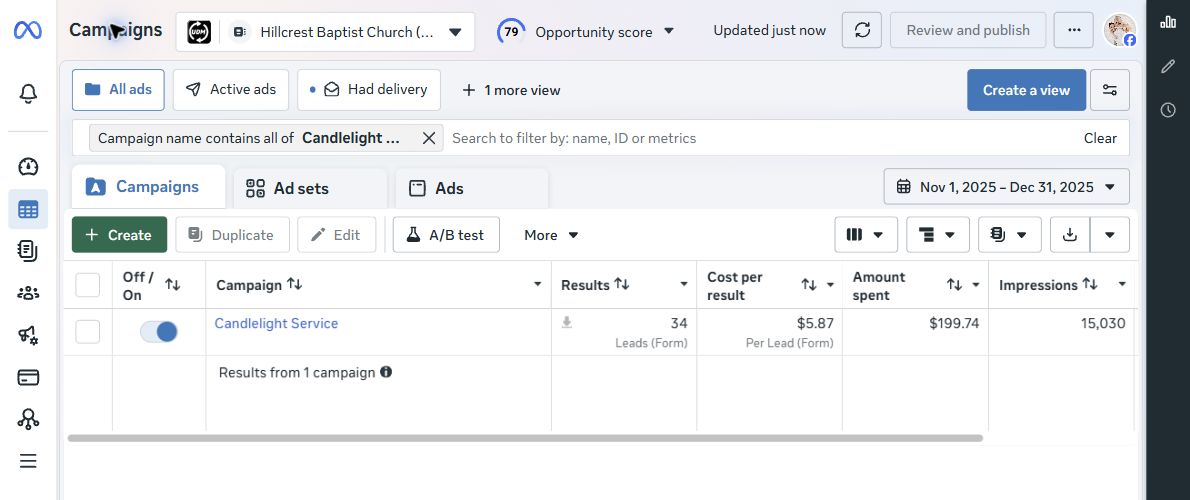
November 1–December 31, 2025 · Mountain Time
Enlarge campaign report
Mauldin, South Carolina · Christmas 2026 landing page
Mauldin First Baptist
One place to understand the Christmas Eve invitation
Mauldin First Baptist’s Christmas Eve page brings the invitation together with consistent church branding, service information, what to expect, and photos from past Christmas gatherings. A video gives visitors a glimpse of the Christmas Eve experience.
Apply this at your church: Give every ad and social post a destination that answers the visitor’s next questions. Keep service information easy to find and use your church’s own photos and video to help people picture the experience.
View the Christmas Eve landing page
Page example reviewed November 8, 2026. This illustrates the invitation experience; it is not a report of 2026 Christmas campaign results.
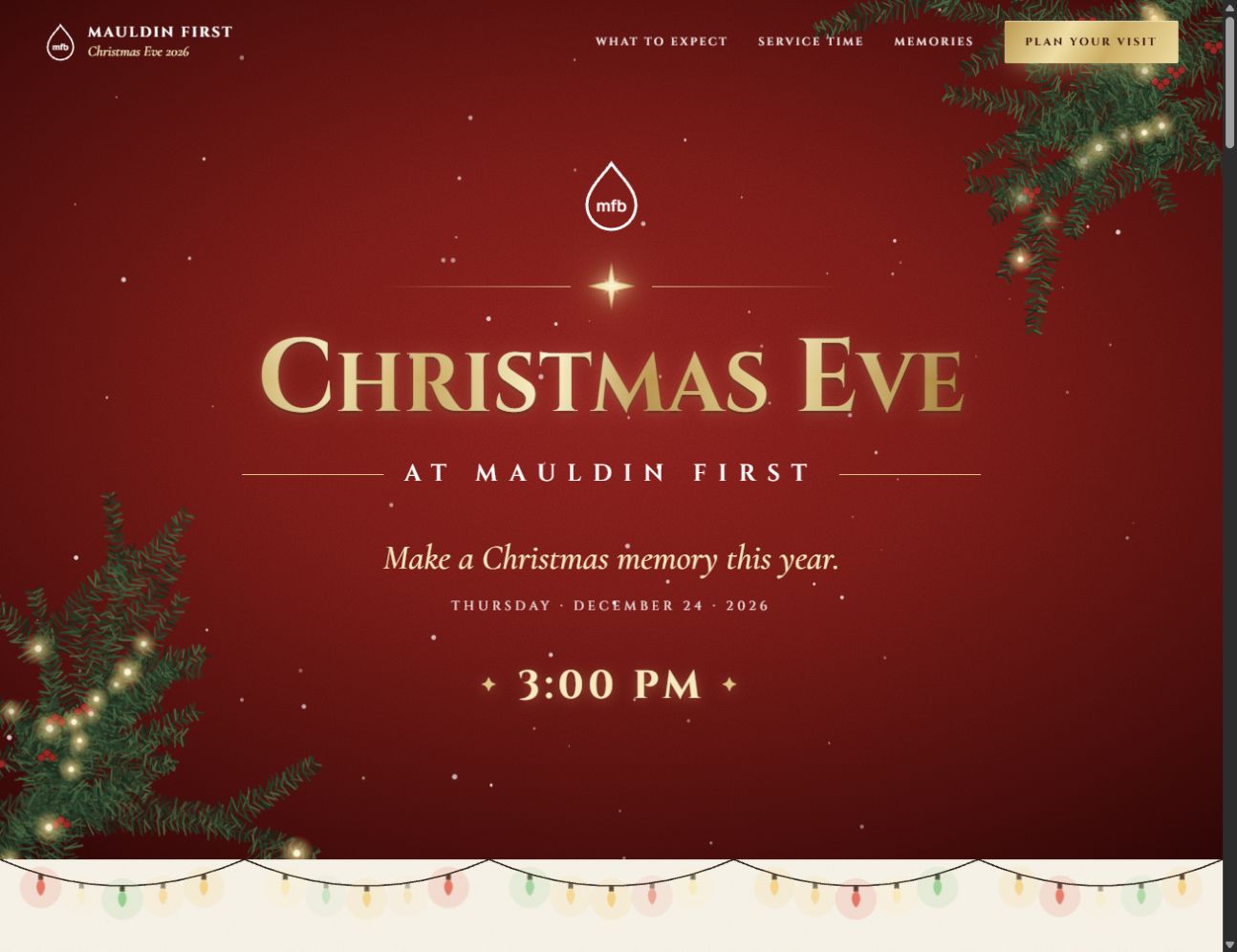
Reviewed November 8, 2026
Enlarge landing page screenshot
Hillcrest’s results are historical Meta-reported form leads for the displayed 2025 reporting dates. A lead does not establish attendance. Individual campaign results are not guaranteed.
Planning another seasonal invitation?
Explore three Easter campaign examplesA Google Ads guide for churches
Help your city find your Christmas service.
When someone searches for a Christmas Eve service nearby, a Google Search ad can take them straight to your service times and a way to plan a visit. Start with one event page, the cities your church can serve, and one action to measure.
- Local searchChristmas Eve service near me
- Search adInvite them to a specific service
- Christmas pageAnswer times, parking, and kids’ questions
- Visit requestConfirm the details and follow up
-
Publish the page you’ll send people to.
Put the service date, times, campus address, directions, parking, and children’s arrangements near the top. Use a real photo or short preview to show what the service feels like. Give visitors a clear Plan Your Visit button and a short form with a confirmation.
Open the page on your phone. Choose a service, submit a test request, and confirm it reaches the person who will welcome guests.
See six Christmas page examples -
Measure a completed visit request.
In Google Ads, open Goals → Summary → Create conversion action and choose website conversions. Connect a Google tag or a linked GA4 event. Track the successful form submission or the confirmation page that loads after a successful submission.
Use that action as the campaign’s Primary goal and set Count to One for leads. Test the submission and verify that the intended event fires once. A page view tells you someone looked. A completed request tells you someone asked to visit.
Google’s website conversion instructions -
Create a Search campaign for your area.
Choose New campaign → Leads → Search and select the visit-request conversion goal. Give the campaign a name you’ll recognize, such as Christmas Eve Search. When the setup asks what to bid for, choose Conversions once you’ve tested your visit-request tracking. Add your city and nearby communities within a realistic drive of the campus. Under Location options, choose Presence to focus on people in or regularly in those locations.
For a focused first test, leave Display and Search Partners unchecked where those options appear. Use keywords and geography. Google restricts personalized targeting around religious belief, so leave uploaded lists and remarketing audiences out of this campaign.
-
Choose searches a guest might type.
In your Christmas service ad group, start with a small set of phrase and exact match keywords that describe the service you’re promoting. Quotation marks indicate phrase match. Brackets indicate exact match. Google can match related meanings, so check the actual searches once ads are running.
Google’s keyword match guideCity keyword starter
"christmas eve service near me""christmas church service greenville"[christmas eve service greenville]
Example keywords for Greenville.
-
Write an ad people can act on.
Create a responsive Search ad with at least three headlines and two descriptions. Include your city, the service, and an action people can take. Use the Christmas page as the final URL. Add sitelinks for times, parking, or kids’ information when those links lead to useful details.
Responsive Search ad requirements -
Set your budget and service dates.
Use the amount your church approved. On a new Search campaign, Campaign total budget can set a cap for the run when available. Google lists a three-day minimum. An average daily budget is a pacing amount. For example, $300 over 15 days works out to $20 a day for planning, and daily spend can vary.
Set start and end dates in the account’s time zone. Confirm your locations, dates, and budget on the review screen before clicking Publish. Submit several business days before launch to leave time for review. If your last service ends before the campaign’s end date takes effect, schedule or pause the ads when the invitation is over.
After launch
Check what people searched and what they did next.
- Ads aren’t showing. Check campaign status, dates, locations, and budget in Ad Preview and Diagnosis.
- Searches don’t fit your service. Review Search terms. Exclude unrelated queries about movies, lyrics, or decorations when they show up.
- People click and few submit. Try the page and form on a phone. Check that service times and the button match the ad.
- Requests come in. Divide spend by completed visit requests. Confirm service times and directions with families, then have the welcome team record arrivals separately.
Using a Google Ad Grants account? Check the program’s separate keyword and conversion requirements before applying this setup. Google Ad Grants compliance guide
Want us to do it for you?
Bring your city, confirmed service times, and the budget you have in mind. CCM can build your Christmas landing page, write the ads, set up the local campaign, and help you track visit requests.
A clear path from information to invitation.
Confirm the information.
Share the service and event plan, campuses, visitor details, desired next step and one approval contact. Identify the decisions still awaiting confirmation.
Choose the message and assets.
CCM organizes the agreed invitation and selects suitable approved photographs, recordings or design material. New recording requests can stay focused on a specific gap.
Review one consistent set of details.
Your church verifies dates, locations, wording and visitor arrangements. CCM checks the agreed creative, links and destination information against those details.
Launch and check the response path.
Check the website and applicable campaign placements on a phone. Where a response form is used, confirm that a successful submission gives the right information and reaches the intended responder.
Review the response and January handoff.
Review the available campaign and website evidence, record the church’s own attendance information separately, and use the confirmed January invitation for appropriate follow-up.
A manageable part for your team. Clear execution from CCM.
| Area | Church provides | CCM handles |
|---|---|---|
| Service and event information | Confirm every gathering, campus, visitor detail and next step. | Organize that information in the agreed creative, website and publishing work. |
| Existing material | Share suitable approved images, video and brand material already available. | Choose, adapt, edit and design the material needed within the purchased scope. |
| Review | Name one contact who can verify facts and return clear approval. | Prepare the work for review and apply the agreed revisions. |
| Advertising and responses | Make the applicable budget decision and name the person covering holiday replies and follow-up. | Handle purchased advertising and response-path execution, and report the available results within scope. |
Start with material your church has already approved. When suitable photos or recordings are available, CCM can adapt them for the agreed work. If new footage is unavailable, a clear graphic or text-led video based on verified church information can still help explain the invitation.
Christmas Church Marketing Planning Checklist
Use this shared planning sheet to keep service details, creative and response responsibilities together. Start with the facts your church can confirm, then assign owners and dates with your team and provider.
Checklist link: https://creativechurchmarketing.com/christmas-church-marketing/#planning-checklist
Christmas Church Marketing Planning Checklist
Use this shared planning sheet to keep service details, creative and response responsibilities together. Start with the facts your church can confirm, then assign owners and dates with your team and provider.
Assign dates that fit your church and provider’s confirmed schedule.
| Action | Owner | Due date | Complete |
|---|---|---|---|
| Confirm each service/event and campus.List Christmas Eve, Christmas Day and separate events accurately. | |||
| Collect accurate visitor details.Check parking, children’s arrangements, accessibility and registration where applicable. | |||
| Select existing images and video.Use approved material and identify any specific missing asset. | |||
| Prepare consistent invitations.Use the same verified information across each agreed placement. | |||
| Update website and service information.Check the visitor page, seasonal banners and campus details. | |||
| Confirm applicable advertising budget and response path.Agree on campaign scope, media spending and where the visitor goes next. | |||
| Test forms and confirmation information.Verify successful inquiry handling and the actual next step. | |||
| Assign holiday response coverage.Identify who replies, follows up and covers absences. | |||
| Prepare the January next invitation.Confirm the next gathering or ministry opportunity and its information. |
Creative Church Marketing · Last reviewed November 8, 2026
Source: https://creativechurchmarketing.com/christmas-church-marketing/#planning-checklist
Need help carrying out the plan? Explore CCM’s church marketing support.
Choose the support that fits your church.
Seasonal work is coordinated through the existing CCM service that fits your needs. The standard full-service offer includes 45 graphics, 12 sermon clips, and up to 10 promotional videos per month. Promotional videos and sermon clips are separate deliverables. Seasonal work uses the agreed monthly scope; narrower advertising services have their own scope.
Advertising media spending is separate from the management fee. Your church controls the advertising budget; the recommendation should reflect the campaign’s goals, audience, location and timing.
Review current packages and pricing, then confirm the applicable advertising budget, setup terms and cancellation terms before starting.
Timing is confirmed after the required access, usable assets, approvals and setup needs are clear.
Compare church marketing packages · Understand advertising management and media spending · See how working with CCM works
Questions about Christmas church marketing.
When should a church start promoting Christmas services?
Start by confirming the service plan, approval contact, materials and response responsibilities. Discuss the dates with your provider early enough to establish a feasible preparation and review schedule. CCM confirms applicable timing and availability before agreeing to a plan.
How should a church promote multiple Christmas service times?
Use one verified information source for the website, social posts, advertising and confirmations. Distinguish campuses, services and separate events, and explain any arrangements that vary between them.
What materials does CCM need for Christmas marketing?
Begin with confirmed gathering details, one approval contact, suitable existing material and the applicable budget decision. CCM can then identify a small, specific information or asset gap for the agreed work.
Give your Christmas invitation a clear plan.
Share your church’s dates and needs. We’ll discuss the scope, timing and current availability before agreeing to a plan.
Request a Free Strategy CallStart with a few details about your church.